Vercel Integration
Trigger Vercel deployments from the Payload admin or automatically after content changes, see what is waiting to go live, follow every build, cancel and roll back — without giving editors a Vercel login.
npm install @payload-solutions/plugin-vercelA headless Payload site usually has a frontend that is built and hosted separately on Vercel: Astro, a static Next export, a second Next app. When an editor publishes, that site has to be rebuilt, and revalidatePath cannot reach a different project. Vercel solves the rebuild with deploy hooks. This plugin solves the editor's side of it: knowing the site is behind, seeing what is waiting, pressing one button, watching the build finish or fail, and undoing a bad release.
import { vercelPlugin } from '@payload-solutions/plugin-vercel'

vercelPlugin({
  targets: [{ slug: 'production', label: 'Website', hook: process.env.VERCEL_DEPLOY_HOOK_PRODUCTION, url: 'https://example.com' }],
  token: process.env.VERCEL_TOKEN, // optional: status, history, cancel, rollback
  collections: { pages: true, posts: true },
  globals: { header: true },
})
Installation
Create the hook, configure a target, first boot, verify before you ship.
Configuration
Every option with its default: targets, tracked collections, ticks, access, retention.
Automatic deploys
The quiet period, who fires it on serverless hosts, pausing, the 60-per-hour limit.
Status, cancel and rollback
Matching a hook call to its deployment, polling, webhooks, re-instatement.
In the admin
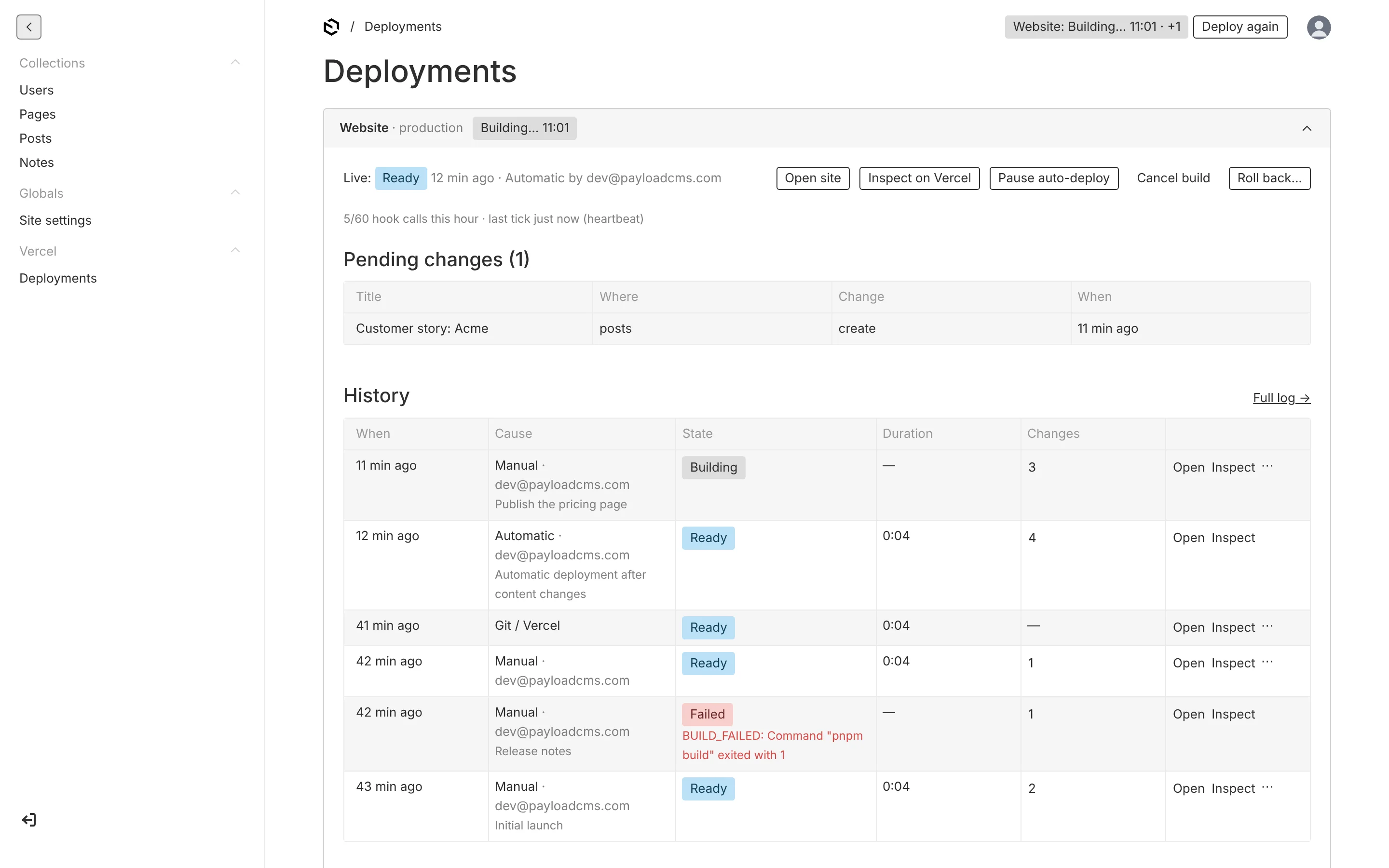
The header widget, the Deploy drawer, the Deployments view and the document pill — for whoever maintains the site.
API
payload.vercel, the /api/vercel endpoints, hooks and the scheduled task.
Recipes
A static marketing site, nightly rebuilds, failure alerts, a preview target, bulk imports.
How it fits together
- Targets — one deploy hook per site or environment. The Vercel project id is read from the hook URL. A target whose env var is unset shows as not configured and never throws.
- Pending changes —
afterChangeandafterDeletehooks on the collections and globals you opt in record one row per document per target; a document saved twenty times before the next deploy is one row. Collections with drafts count publishes and unpublishes only. - A window — every change opens or extends a debounce window (60 s quiet period, 10 min maximum). When it is due, the target is deployed once and the pending rows fold into that deployment's summary.
- The ledger — every trigger is a row in
vercel-deployments: who, why, what changed, and with a token the Vercel deployment id, state, URL, duration and error. Failed and canceled builds put their changes back into pending; a rollback puts back everything newer than the restored deployment. - The admin — a status pill and Deploy button on every page, a Not deployed yet / Live pill on every tracked document, and a Deployments view per target.
What you get out of the box
- Header widget, Deploy drawer, Deployments view and document pill, built from Payload's own UI components so they follow the admin theme.
- Automatic deployments that need no runner: the window is fired by the admin's own status poll, a beacon when the tab closes, the
vercel-tickscheduled task or any cron — it works on Vercel Hobby, whose cron runs once a day. - Status by polling and, on Pro and Enterprise accounts, by signed webhooks.
- Cancel and instant rollback from the admin.
- A local API (
payload.vercel.*), REST endpoints under/api/vercel/*, and hooks (onReady,onError,shouldTrack). - A mock Vercel server for development and tests, so nothing needs a Vercel account until you point it at one.
What it is not
It does not replace ISR. If Payload and the frontend are one Next project, revalidatePath / revalidateTag in afterChange hooks is the right tool for page-level updates; use this plugin for full rebuilds and for frontends that live in another project. It does not manage Vercel itself — domains, environment variables, logs — and it does not store build logs; the admin links to Vercel's inspector for those.
Requirements
Payload ^3.88, @payloadcms/ui, @payloadcms/next, React 19. A Git-connected Vercel project (deploy hooks need one). Optional: a Vercel access token for status, cancel and rollback; a Pro or Enterprise team for webhooks.
Status
0.2.0 — available. Package @payload-solutions/plugin-vercel, MIT. Vercel is a trademark of Vercel, Inc. This plugin is not affiliated with or endorsed by Vercel.